
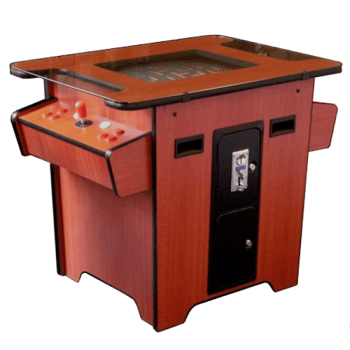
On the 3rd floor there is a sitting arcade cocktail table meant to play one or two player games. It includes hundreds of classic arcade games.
Turning Machine On
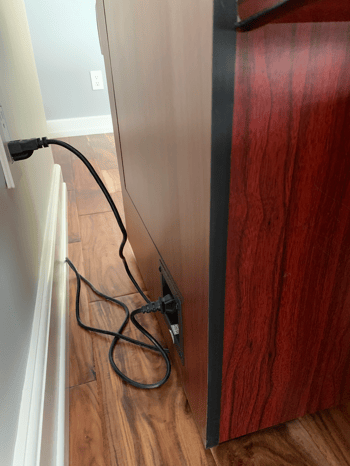
There is a switch on the back side of the cabinet (by the wall). Turn that on and the arcade unit will boot up.
Choosing The Game to Play
Once the machine is powered on you will have a menu listing all of the games you can play. The general flow is:
- Choose the type of game you want to play (horizontal or vertical)
- Choose the game you want to play.
- Start the game and play
- When you are done, exit the game and go back to the menu in step 2.
Detailed instructions for each step are below.
Horizontal vs. Vertical Games
There are two types of games: vertical games and horizontal games.
Vertical Games
In vertical games like Pac-Man, Galaga, Donkey Kong and Frogger, the game play is narrower (meaning more top to bottom then it is left to right).
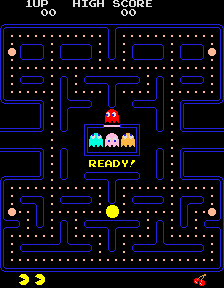
As a result, in each of these classic games, they were originally formatted to be displayed on a vertically mounted monitor.
For these games, you sit on the two sides of the table opposite each other.
Popular Vertical Games
- Centipede
- Defender
- Dig Dug
- Donkey Kong
- Frogger
- Galaga
- Mario Bros.
- Ms. Pac-Man
- Pac-Man
- Q*bert
- Space Invaders
- Tetris
- Tron
- Zaxxon
Horizontal Games
On the other hand, horizontal games like Defender, Joust, Asteroids, Robotron, Missile Command and fighting type games the game play is more left to right or right to left.
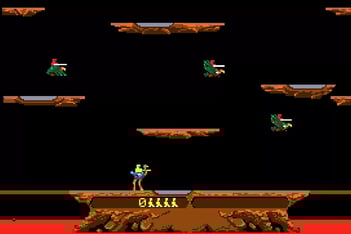
For horizontal games, you sit next to each other on the front side of the machine.
Popular Horizontal Games
- Asteroids
- Cyberball 2072
- Defender
- Double Dragon
- Gauntlet
- Golden Tee Golf
- Joust
- Marble Madness
- Missile Command
- Out Run
- Pole Position
- Punch-Out!!
- Star Wars
- Street Fighter Alpha
- X-Men
Choosing the Type of Game to Play
When the machine boots and presents the list of available games, it only presents those available for the current type (vertical or horizontal). So, you need to decide which type of game to play and switch to that mode to choose your game and determine where to sit.
Switching From Horizontal Games to Vertical Games
If the machine is in Horizontal Game mode (this is the default mode it starts in), then press either of the top center shooting buttons (circled in yellow in below photo) for 1 second then release it to switch screen to the Vertical Mode:
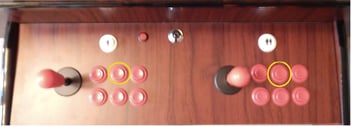
Note: If the right center button doesn't work, try the left center button.
Switching From Vertical Games to Horizontal Games
If the game is in Vertical Game mode, press the bottom right hand shooting button (circled in yellow in below photo) for 1 second then release it to switch screen to the Horizontal Mode:
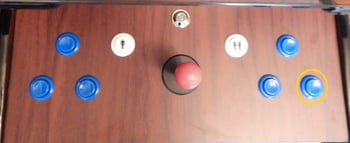
Note: The buttons on the machine are red not blue.
Choose the Game You Want to Play
Depending on which mode (horizontal or vertical) you select, you will get a different list of games. In addition, you use a different joystick to choose the games.
When you are in horizontal mode, use the left joystick on the front side.
When you are in vertical mode, use the joystick on the left side of the machine.
Use the joystick to scroll up and down to find the game you want. Then press the 1-Player White Start Button to LOAD the game. The game may take a little bit to load.
Start the Game and Play
Then after the game is FULLY loaded press the 1 or 2 White Player Start Button to start a game. Sometimes for 2 player games it may require you to press the 2 Player Start Button an additional time to give the game a 2nd credit. Verify the number of game credits you have on the screen.
Pressing the Red Button
Remember there are some horizontal games that are simultaneous play (where you are playing directly against the other player). So if you choose 2 players on a simultaneous game both players need to be ready to start the game at the same time.
There are also some games that are not simultaneous play (where it is player one’s turn and then player two’s turn). In some cases with these non-simultaneous games when you choose 2 players you will find out that when it’s player two’s turn that it will not shift to their side but instead stay on player one’s side. This would normally cause the 2nd player to switch seats with player 1 on their turn.
When this situation occurs simply press the small red button on the control panel.
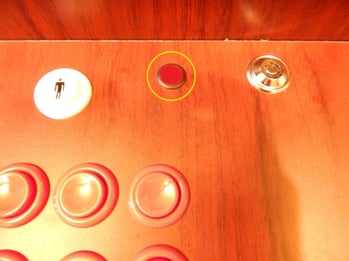
When it is pressed to its ON position then ALL joysticks on BOTH the Vertical & Horizontal Sides become LIVE ALL AT THE SAME TIME. What this means is that if you pressed the Red Button to have a horizontal game switch to Player 2 then keep in mind that since all joysticks are now live,Player 1’s controls can operate Player 2’s game and vice versa. So when the Red Button is activated players need to keep their hands off of the control panel unless it is their turn to play. Also when playing simultaneous horizontal games remember to press the Red Button to its OFF position. Additionally, when playing vertical games you also need to make sure that the Red Button has been pressed to its OFF position or Player 1’s controls will affect Player 2’s game and vice versa.
Exit the Game and Return to the Menu
When you are done playing your game and want to play a different game, you need to exit the game and return to the menu.
To Exit a game at any point of game, press and hold the 1 Player White Start Button until a box pops up giving you a choice to “Continue” the current game or “Exit” the game. Press the 1 Player White Start Button to continue playing the current game or use the joystick to scroll down to “Exit”. Then press the 1 Player White Start Button to exit the game.
Shutting Down
When you are all done playing you can power off the machine by flipping the switch on the back side of the machine.