
Whispering Pines Lodge is set up with multiple security systems to help protect you, your family, and the house.
There are two major systems on the house.
Using the security cameras
There are multiple security cameras on the house. These provide a nearly 360 view of the house exterior. They also provide views of key structures of the house including the pool, the playset, and the hot tub.
As a guest you can monitor them for your own safety.
For example, if your family is swimming down in the pool you can use the camera to monitor the area.
In the kitchen there is a Google Nest Hub that looks like this:

If you do a slide down gesture from the top of the screen, you will see a menu like this:
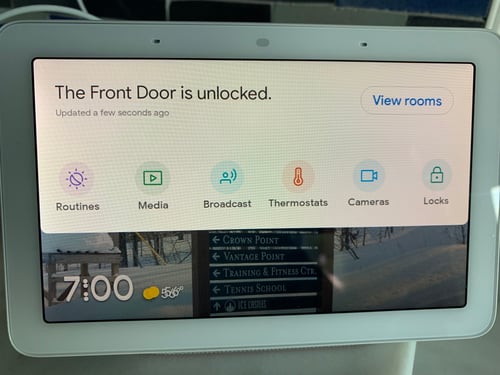
If you click on the "Cameras" button, you will see a list of all of the cameras. Click on one of them and you can then get a live stream from that camera.
Using the home alarm system
The house also has an alarm system with door monitors and motion sensors, and is monitored 24/7 by an alarm company.
As a guest, you can choose to use this for your safety.
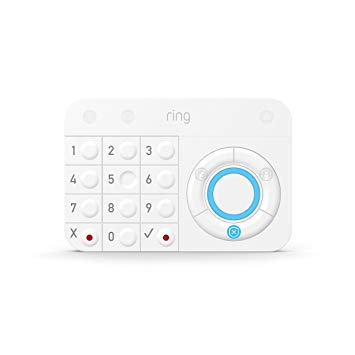
The control for the alarm is this device in the entryway:
Turning off the alarm
If the alarm is enabled and you want to turn it off, type the access code you were given for the front door and then hit the blue shield at the bottom. This will turn off the alarm.
The alarm is also automatically turned off when you use the keypad to unlock the front door.
Setting the alarm when you are home (for example, at night)
If you want to set the alarm to monitor all of the doors, you can put the alarm into Home Alarm mode.
To do this, type in the access code you were given for the front door and hit the button on the upper right. After 60 seconds the alarm will be enabled and if any doors are opened it will sound and the alarm monitoring company will be notified.
If you do turn this on, make sure everyone in your party knows, so they don't accidentally open the basement door to the hot tub or go out on the deck and accidentally trigger it.
Setting the alarm when you are away
If you want to set the alarm to monitor all of the doors and turn on the motion sensors, type in the access code you were given for the front door and hit the button on the upper left. After 60 seconds the alarm will be enabled and if any doors are opened or if it detects motion in the house it will sound and the alarm monitoring company will be notified.
Note: Do not put it in this mode if you are going to be in the house since the motion sensors are now activated. If you walk around the house just to go to the bathroom at night, it could trigger the alarm.